PRODUCT PREVIEWThis site showcases Orbit’s local development build. Screenshots and replays use example content. The app, accounts, uploads and live AI are not public yet.Availability →

Eight work modes in one workspace.

Chat, write, research, analyse, plan, code, investigate markets or hand a task to the agent. Each mode follows a different workflow, and every one keeps the evidence next to the answer.

Each mode follows its own workflow.

Pick a mode below to see what it does, what you get back and where it stops. You can switch mid-conversation without losing context.

Chat

Fast, conversational help, kept as a saved chat you can search, edit, regenerate and undo.

You get

Replies that stream in, an edit-and-resend on your last message, and a stop button that keeps what was already written.

Where it stops

Without attached files it answers from the conversation. Use Research when you need quotations from your own documents.

Click a citation. See the exact passage.

Orbit retrieves the most relevant passages from your files, asks for exact quotations, and checks each one against the file before it is shown as evidence. A quote it cannot find is labelled Not verified, never quietly kept.

  • Evidence, Inference, Uncertain, Not verified
  • “Sources disagree” when figures conflict
  • Quotes highlighted in the source on click
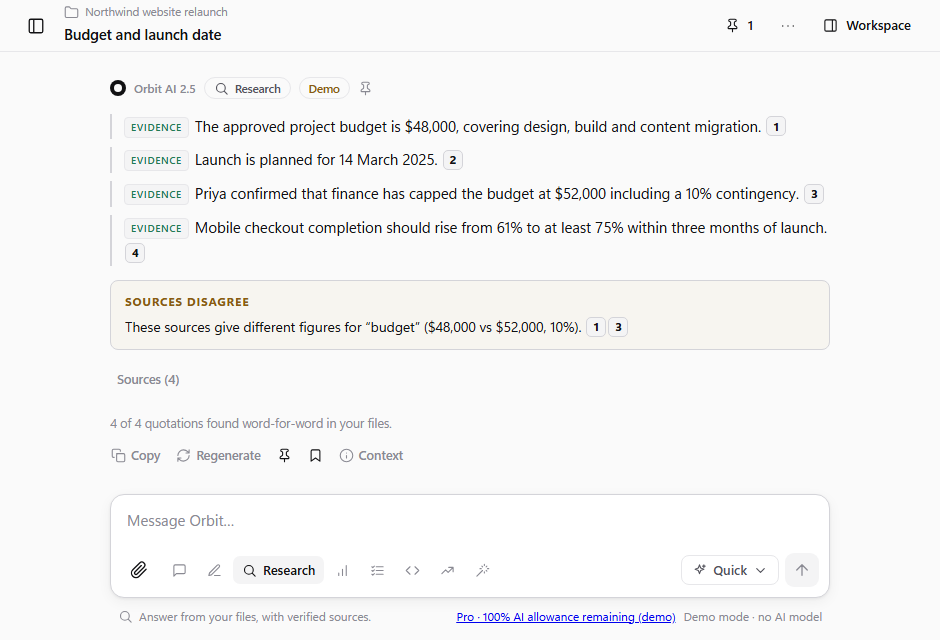
Orbit answering a question from two files, with each claim labelled and numbered citations
Research mode in the real app (demo mode).

Change one section. Keep the rest.

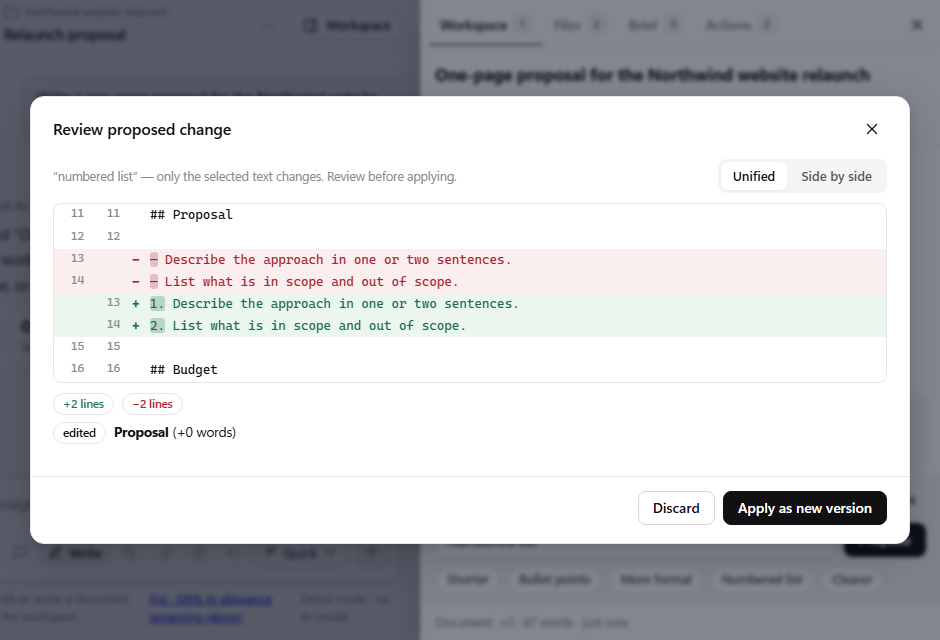
Documents, tables and code develop beside the chat. Ask for a change to a section and review a side-by-side diff before applying it. Every save is a version you can compare, restore or download.

  • Section-level revision with a reviewable diff
  • Version history with compare and restore
  • Word, Markdown, CSV and code download
The review screen for a proposed change to one section of a document, shown as a side-by-side diff
Reviewing a proposed change before it is applied.

The model reads the figures. It never does the sums.

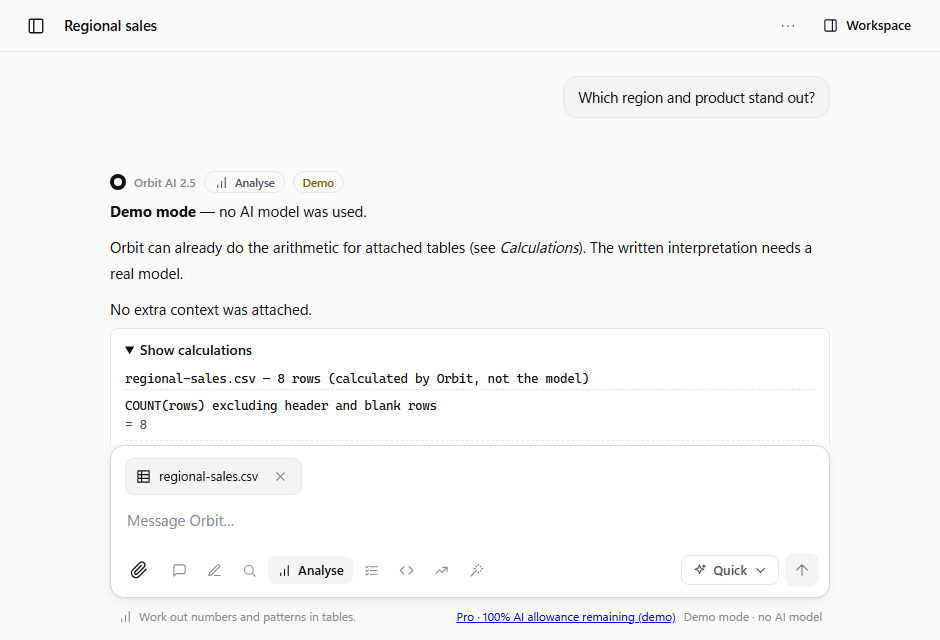
Attach a spreadsheet and Orbit calculates the statistics itself, listing every formula. The same calculator is available to the agent, and it is a fixed arithmetic parser, not a way to run code.

  • Profiles, groupings and data-quality flags
  • Formulas listed beside every figure
  • Compare two files for changed figures
Analyse mode showing statistics computed from a table, with the formulas listed
Analyse mode: figures with their formulas.

Memory that only changes when you say so.

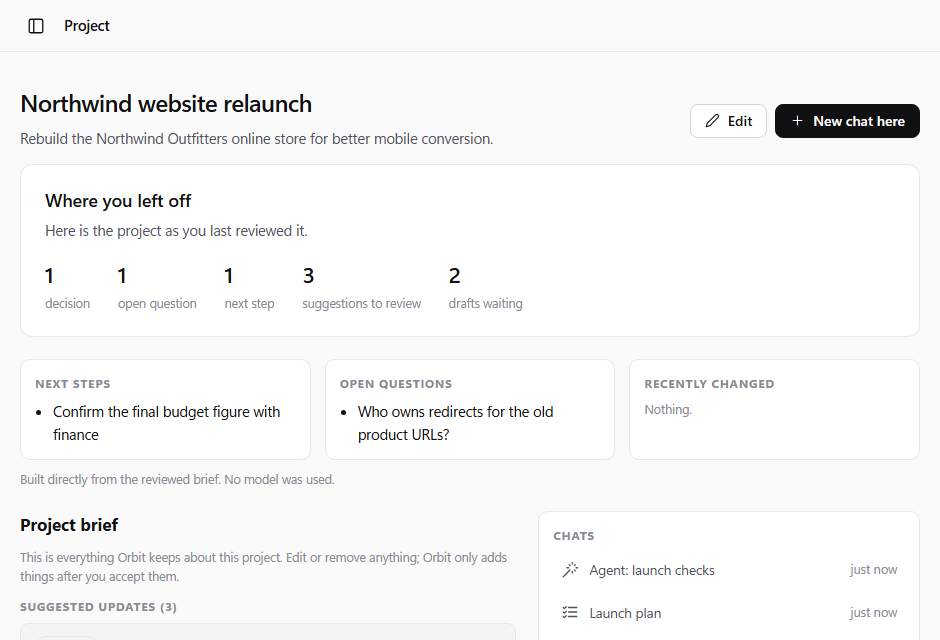
Each project keeps a brief of goals, decisions, open questions and next steps. Orbit suggests items; you accept or dismiss them. After a week away, a “where you left off” page is built from what you reviewed, without calling a model.

  • Suggestions, never silent updates
  • Where you left off, built locally
  • Temporary chats stay out of project memory
A project page showing where you left off and suggested brief items waiting for review
A project’s “where you left off” page.

Cost is shown before you send.

1

An estimate first

Orbit estimates the size of a request before it is sent, so a long document never turns into a surprise.

2

A confirmation for big ones

Anything above a threshold asks you to confirm. Orbit Swift and Orbit Depth modes are explained honestly, including what each costs you in allowance.

3

A limit that holds

When your monthly allowance would be exceeded, the request is refused rather than charged. The meter in Settings shows what is left.

Keyboard shortcuts.

CtrlK

Search chats, documents and files from anywhere.

/

Slash commands in the message box switch modes and actions.

Esc

Stop a reply. What was already written is kept.

↑

Edit and resend your last message.

A closer look today. The working app comes next.

Explore the local preview through its screenshots and examples. Public accounts, uploads and live AI are not available yet.